Fully fledged mobile mixer

DJ Studio 5 is a mobile DJ station that allows you to manipulate music. The app and all of its functions are completely free, unlike previous versions, which required an in-app purchase to unlock unlimited playback.

Top Recommended Alternative

Spin, mix and scratch

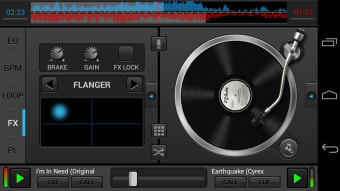
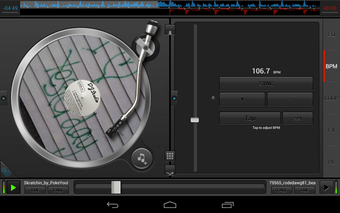
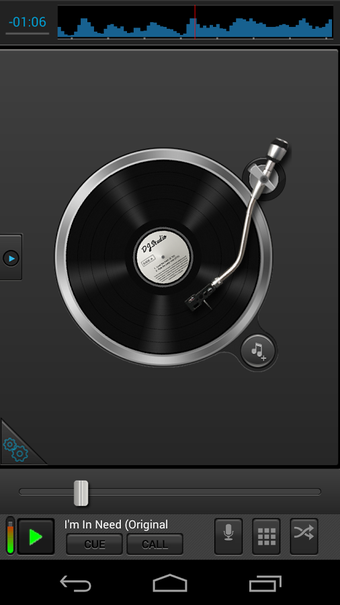
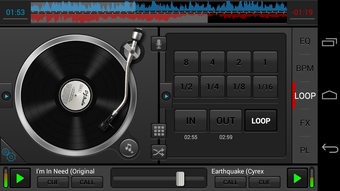
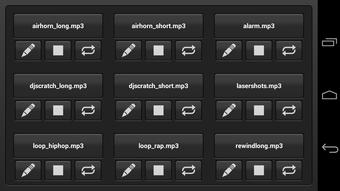
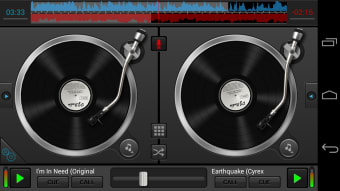
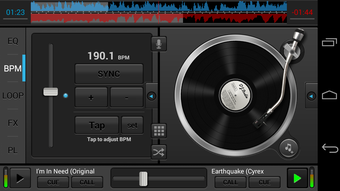
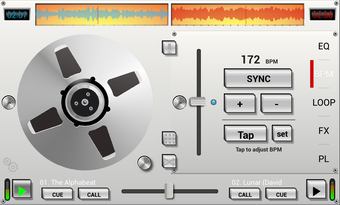
The interface of DJ Studio 5 contains either a single deck or twin decks. Along with the decks, there are different tools to manipulate the music like volume sliders, loop creators, and BPM (beats per minute) adjusters.

You choose music on the device and load the tracks on each deck. Once they are loaded, you can start mixing the songs together.

Practice makes perfect

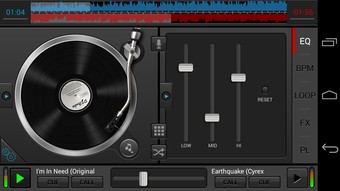
For a novice, DJ Studio 5 requires some practice because it is a bit confusing at first. DJ Studio 5 also contains an equalizer where you can change sound levels for the songs.

It is also possible to record mixes live and share music on Soundcloud. If you are familiar with how DJ equipment works, then DJ Studio 5 is a great tool to use.

On smaller devices, using some of the dial and slider tools in the app are a little difficult and DJ Studio 5 may have some compatibility issues.

Become the life of the party

DJ Studio 5 is a fun app that lets you experiment with mixing music and full access to all its features makes it one of the most comprehensive free DJing apps for Android.

  • Pros

    • Comprehensive
    • Lots of options
  • Cons

    • Steep learning curve
 0/9

App specs

  • License

    Free

  • Version

    5.9.1
  • Latest update

  • Platform

    Android

  • OS

    Android 13.0

  • Language

    English

    Available languages

    • English
    • Portuguese
    • Spanish
    • Portuguese
    • French
  • Downloads

    239.5K

    Last month's downloads

    • 345
  • Size

    15.04 MB

  • Developer

  • Download Options

    APK, Google Play

  • Filename

    com.beatronik.djstudiodemo_5.9.1.xapk

Program available in other languages


User reviews about DJ Studio 5 - Free music mixer

3.8

2 reviews

Add review

Main reviews for you

  • Anonymous user

    Cant upload a new song on the non playing deck with a song playing because it will start playing the new uploaded song without finishing the one currently playing. Nothing in the settings stop this problem. Basically you have to load 2 songs wait until both have played empty both decks and reload. Its a real pain.


  • Anonymous user

    I would rate it a 10 if it had some effects but the real issue is you can only load both decks before you start playing and CANT add any more while the other deck is playing because it will automatically start playing the new song you added onto the unused deck even with the setting to help you that says it would start it at the end of the song. If they would fix it so that it will allow us to load the next track onto the next deck while the other is playing without switching I would love it.

More

You may also like

Alternatives to DJ Studio 5 - Free music mixer

Explore Apps

Latest articles

Laws concerning the use of this software vary from country to country. We do not encourage or condone the use of this program if it is in violation of these laws.
Softonic

Is DJ Studio 5 - Free music mixer safe?

100/100

Score result: Clean

This file passed a comprehensive security scan using VirusTotal technology. It is safe to download.

  • Virus free
  • Spyware free
  • Malware free
  • Verified by Security Partners

    VirusTotal logo

Scan Info

Last scan
Wednesday, January 7, 2026
Scan provider
VirusTotal · Full report

File Integrity

File
com.beatronik.djstudiodemo_5.9.1.xapk
SHA256
a88ac85e7208112b497076a4dc630ac8ba22b8e63ea81752d35cfae25808deab
SHA1
9b61711e7f1dadfe1f46ec94fa3888f9a0a4d9a5

Softonic security commitment

DJ Studio 5 - Free music mixer has been thoroughly scanned by our advanced security systems and verified by industry-leading partners. This file comes from the official developer and has passed all our security checks, showing no signs of viruses, malware, or spyware. For more information, visit our Security and Trust Center

Softonic

What is a Validated Developer?

Validated Dev

This badge indicates that Softonic has received authorization to offer the software from the developer or a designated representative, through the Softonic Publisher Center or other agreements. Content, ownership and compliance are responsibility of the developer.

More details in terms and conditions.

Are you a developer?

Join the Softonic Publishing Center and reach millions of users.

Not a developer?